pruefprotokoll-app
Prüfprotokoll-App




Eine Fullstack-Webanwendung zur Verwaltung von Prüfprotokollen. Das Projekt zeigt eine saubere Umsetzung einer kleinen Business-Anwendung mit Angular-Frontend, ASP.NET-Core-Web-API, Entity Framework Core, PostgreSQL, Docker und automatisierter CI/CD-Pipeline.
Die Anwendung wurde als kompaktes Portfolio-Projekt entwickelt und demonstriert typische Aufgaben aus der modernen Webentwicklung: Formularvalidierung, REST-Kommunikation, Datenpersistenz, serviceorientierte Backend-Struktur, Containerisierung und automatisierte Qualitätsprüfungen.
Inhaltsverzeichnis
- Projektziel
- Funktionen
- Tech Stack
- Architektur
- Projektstruktur
- Voraussetzungen
- Start mit Docker
- Backend lokal starten
- Frontend lokal starten
- Tests und Qualitätssicherung
- License
Projektziel
Ziel des Projekts ist eine einfache, nachvollziehbare Prüfprotokoll-Verwaltung, mit der Prüfberichte erstellt, angezeigt, bearbeitet und gelöscht werden können. Der Fokus liegt nicht auf Funktionsumfang, sondern auf einer klaren technischen Struktur, reproduzierbarem Setup und nachvollziehbarer Codequalität.
Funktionen
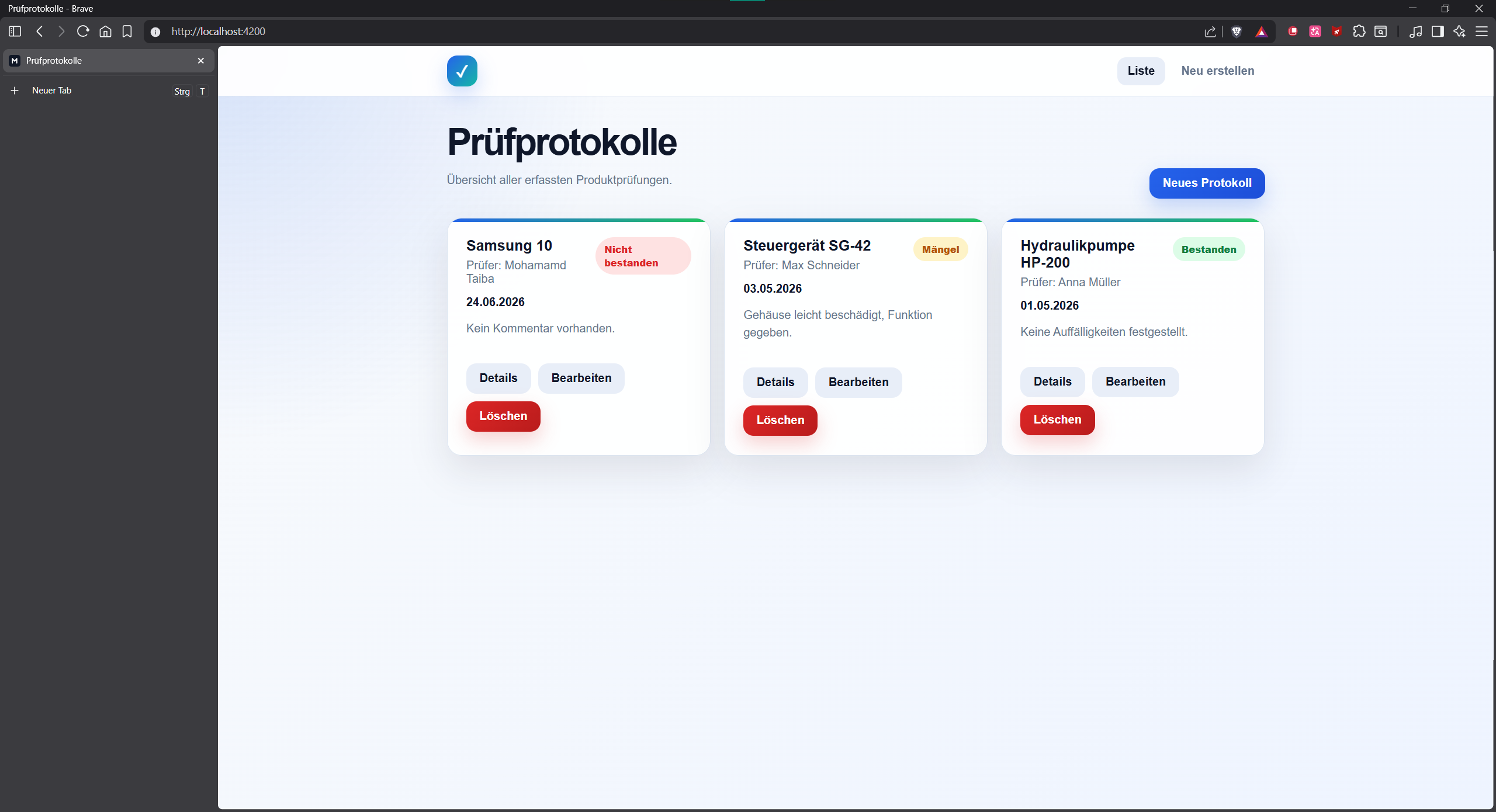
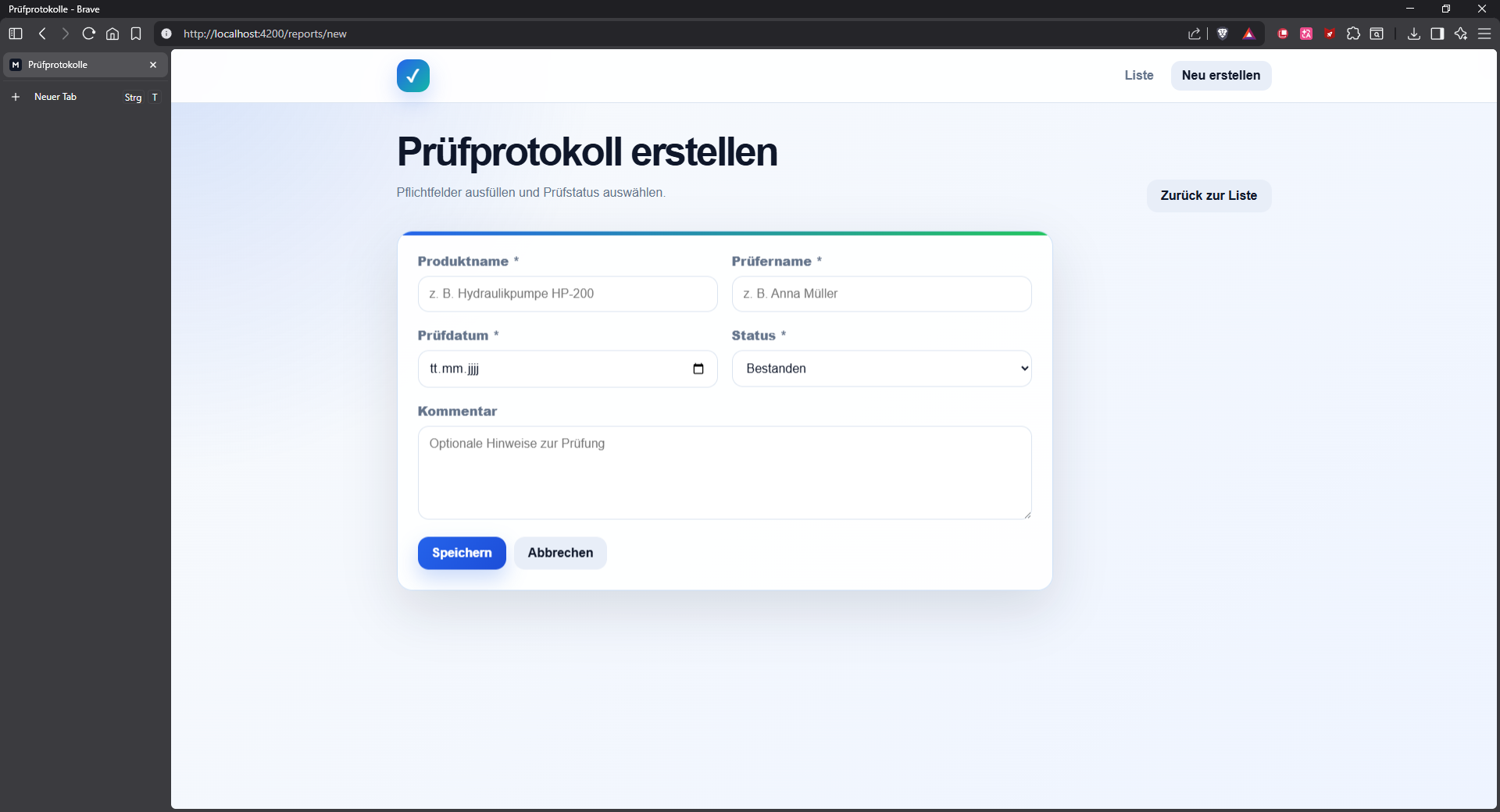
- Prüfprotokolle erstellen, anzeigen, bearbeiten und löschen
- Detailansicht für einzelne Prüfprotokolle
- Statusauswahl mit
Bestanden,MängelundNicht bestanden - Formularvalidierung im Frontend
- Serverseitige Validierung im Backend
- PostgreSQL-Datenbank mit EF-Core-Migration und Seed-Daten für Demo-Zwecke
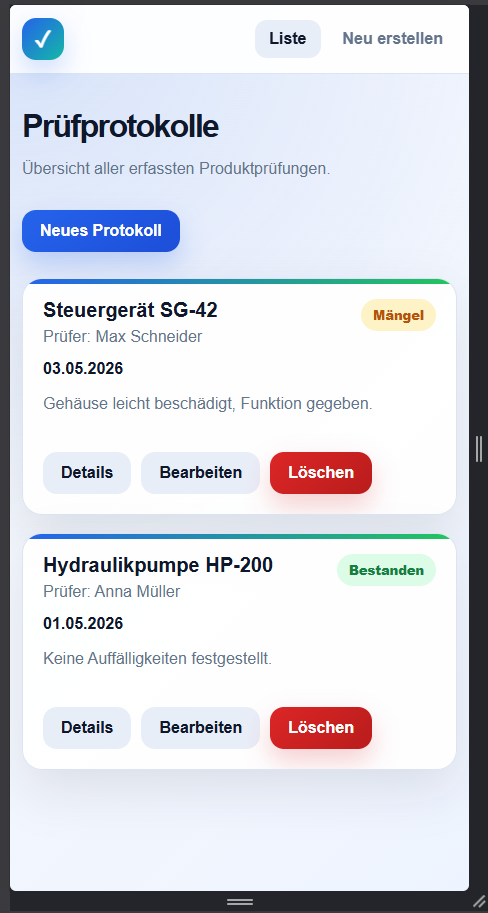
- Responsive Oberfläche für Desktop und Smartphone
- REST-API mit klaren Endpunkten
- Docker-Setup für Frontend, Backend und PostgreSQL
- GitHub-Actions-Pipeline für Installation, Tests, Linting, Build und Docker-Image-Erstellung
Screenshots
Übersicht der Prüfprotokolle
Prüfprotokoll erstellen
Responsive Ansicht
Tech Stack
| Bereich | Technologie |
|---|---|
| Frontend | Angular 17, TypeScript, HTML, CSS |
| Backend | ASP.NET Core Web API, C#, .NET 8 |
| Datenbank | PostgreSQL, Entity Framework Core 8 |
| Tests | xUnit/.NET Tests, Angular/Karma/Jasmine |
| Webserver | Nginx für das Angular-Frontend im Docker-Container |
| Containerisierung | Docker, Docker Compose |
| CI/CD | GitHub Actions, GitHub Container Registry |
Architektur
Browser
  |
  | HTTP
  v
Angular Frontend
  |
  | /api/inspectionreports
  v
ASP.NET Core Web API
  |
  | Entity Framework Core
  v
PostgreSQL-Datenbank
Im lokalen Entwicklungsmodus leitet Angular API-Aufrufe über proxy.conf.json an das Backend weiter. Im Docker-Betrieb übernimmt Nginx die Weiterleitung von /api an den Backend-Container.
Projektstruktur
pruefprotokoll-app/
├── .github/
│   └── workflows/
│       └── ci-cd.yml
├── backend/
│   ├── Pruefprotokoll.Api/
│   │   ├── Controllers/
│   │   ├── Data/
│   │   ├── Migrations/
│   │   ├── Models/
│   │   ├── Repositories/
│   │   ├── Services/
│   │   └── Program.cs
│   ├── Pruefprotokoll.Tests/
│   └── Dockerfile
├── frontend/
│   ├── src/app/components/
│   ├── src/app/models/
│   ├── src/app/services/
│   ├── proxy.conf.json
│   ├── nginx.conf
│   └── Dockerfile
├── docker-compose.yml
└── README.md
Voraussetzungen
Für den Start mit Docker:
- Docker Desktop
- Docker Compose
Für den lokalen Start ohne Docker:
- .NET 8 SDK
- Node.js 20 oder kompatibel
- npm
- PostgreSQL 16 oder kompatibel
Start mit Docker
Im Hauptordner des Projekts ausführen:
docker compose up --build
Danach ist die Anwendung erreichbar unter:
http://localhost:4200
Die API ist erreichbar unter:
http://localhost:5000/api/inspectionreports
Docker Compose startet drei Services:
frontend   Angular-Build mit Nginx auf Port 4200
backend    ASP.NET-Core-Web-API auf Port 5000
postgres   PostgreSQL-Datenbank auf Port 5432
Die Datenbankdaten werden im Docker-Volume postgres_data gespeichert.
Container stoppen:
docker compose down
Container inklusive Datenbank-Volume löschen:
docker compose down -v
Container neu bauen:
docker compose build --no-cache
docker compose up
Backend lokal starten
PostgreSQL lokal starten und folgende Datenbank bereitstellen:
Host: localhost
Port: 5432
Database: inspectionreports
Username: postgres
Password: postgres
Danach Backend starten:
cd backend/Pruefprotokoll.Api
dotnet restore
dotnet run
Die API läuft danach unter:
http://localhost:5000
Beim ersten Start werden die EF-Core-Migrationen automatisch angewendet und zwei Demo-Datensätze eingespielt.
Frontend lokal starten
In einem zweiten Terminal:
cd frontend
npm install
npm start
Die Angular-App läuft danach unter:
http://localhost:4200
Das Frontend nutzt im lokalen Entwicklungsmodus proxy.conf.json, damit API-Aufrufe an /api automatisch an das Backend weitergeleitet werden.
Tests und Qualitätssicherung
Backend-Tests ausführen:
cd backend/Pruefprotokoll.Tests
dotnet test
Frontend-Tests lokal ausführen:
cd frontend
npm test
Frontend-Tests im Headless-Modus ausführen, wie in der CI-Pipeline:
cd frontend
npm test -- --watch=false --browsers=ChromeHeadless
Frontend builden:
cd frontend
npm run build
License
Copyright (c) 2026 Mohammad Taiba. All rights reserved.
This project is published for portfolio and review purposes only. See LICENSE.